Ugreen Nasync Dh4300 Plus Specs, Features, and Value: Is it worth the price tag?
Introduction
The Ugreen Nasync DH4300 Plus is a compact 4-bay desktop NAS positioned at buyers who want a modern private cloud with media capabilities, AI-enabled photo management, and faster-than-gigabit networking without deploying a rack-mounted system. With manufacturer claims of a potent ARM-based processor, 2.5GbE networking, HDMI output and a privacy-first software stack, the DH4300 Plus aims to bridge the gap between consumer-grade backup boxes and midrange home/SMB servers.
This article examines what the DH4300 Plus actually offers, how it performs for common real-world tasks (media streaming, backups, photo libraries, and light business use), and whether its feature set and price make it a good buy compared with other 4-bay NAS options. The goal is to give a balanced, practical assessment focused on what buyers care about: reliability, performance, software ecosystem, expandability, and value.
Product overview and official specifications
The DH4300 Plus is a diskless (no drives included) 4-bay desktop NAS. It is built around an ARM-based Rockchip SoC, ships with 8 GB of LPDDR4X system memory, and includes 32 GB of internal eMMC for the operating system. The system storage hosts Ugreen’s UGOS Pro — an OS with integrated features such as AI-powered photo indexing, remote and multi-platform backup, privacy-first settings, and multimedia playback through an HDMI port.
Key hardware highlights
- Processor: Rockchip RK3588C (ARM, multi-core performance suited for NAS duties and media decoding)
- Memory: 8 GB LPDDR4X (non-expandable in the typical retail unit)
- Storage bays: Four hot-swap 2.5"/3.5" SATA bays (tool-less trays on many units), supporting common RAID levels (JBOD, Basic, RAID 0/1/5/6/10)
- System storage: 32 GB eMMC for OS and local apps
- Networking: Single 2.5GbE RJ45 port for faster LAN throughput compared to standard 1GbE
- Ports: USB-C 3.2 Gen 1 (front), two USB-A 3.2 Gen 1 (rear)
- Video output: HDMI capable of 4K @ 60Hz for direct media playback or local UI access
- Power: External power adapter (12V), compact desktop footprint
Software and features
UGOS Pro — the system software that ships on the DH4300 Plus — focuses on a few differentiating features:
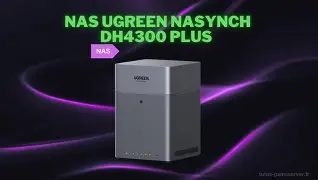
- AI-powered album management: face, object and pet recognition plus deduplication and semantic search to help organize photo collections automatically.
- Private cloud & backups: clients for Windows, macOS, iOS and Android for automatic backups and remote access without third-party clouds.
- Privacy and certifications: marketing emphasizes a privacy-first approach and compliance with common security standards, suitable for users who want to avoid public cloud exposure.
- 4K multimedia: hardware decoding/transcoding support and HDMI output to drive a TV or monitor directly from the NAS.
In-depth analysis: real-world use cases and performance expectations
When evaluating a NAS, it helps to break down the most common ways people actually use these devices. The DH4300 Plus targets several overlapping audiences: home media enthusiasts, photographers and families with large photo libraries, small offices that need centralized backup, and power users who want local streaming and light container workloads.
Home media server and streaming
The presence of an HDMI port and hardware decoding capability makes the DH4300 Plus attractive for users who want to connect a NAS directly to a TV or AV receiver and play 4K video without a separate streaming device. For straightforward playback (MP4, H.264, H.265) the system should handle 4K @ 60Hz smoothly. Users who run media server software (Plex, Jellyfin, Emby) will appreciate faster local transfers over 2.5GbE when the network supports it, but should confirm transcoding performance if many simultaneous remote streams are required — ARM chips vary in how well they handle multiple real-time transcodes compared with x86 CPUs.
Photographers, families, and AI features
Ugreen has emphasized AI-driven album organization: face recognition, duplicate detection, and semantic tagging. In practice this means time savings for users who want their photo libraries quickly searchable by person, pet, or object. For amateur and prosumer photographers who keep large, local photo archives rather than offloading everything to cloud services, the DH4300 Plus provides a tidy on-premise solution that avoids monthly cloud fees and privacy concerns.
Discover deals on Laptops & Computers — updated daily.
Browse Now →Small office backups and NAS as centralized storage
Small businesses that need reliable file sharing, scheduled backups, and simple RAID-based redundancy benefit from the DH4300 Plus’ support for RAID 5/6 and multiple client platforms. The 2.5GbE link reduces bottlenecks for single fast workstations, and the USB ports make it easy to add external drives for offsite backups. However, enterprises that need advanced features such as iSCSI heavy virtualization, large-scale concurrent SMB/NFS workloads, or hot-swappable redundant power supplies may find this class of device limiting.
Power users, containers and expandability
Some users expect to run Docker containers or virtual machines on their NAS. The DH4300 Plus can run lightweight containers and local apps through UGOS Pro, but its ARM CPU and the lack of PCIe expansion mean it is not a drop-in replacement for an x86-based NAS designed for heavier virtualization. Buyers who prioritize expandability, additional M.2 NVMe caching slots, or PCIe-based 10GbE upgrades should verify the unit’s hardware expansion limitations before purchase.
Pros & Cons
Pros
- Strong multimedia capability with HDMI 4K @ 60Hz output for direct playback and local UI access.
- 2.5GbE networking provides faster local transfer speeds for modern home/small-office networks.
- 8 GB RAM and 32 GB eMMC give the unit responsive UI and headroom for lightweight applications.
- AI-driven photo management simplifies cataloging and searching large photo libraries.
- Compact, quiet desktop design suitable for living-room or small office placement.
- Support for a wide range of RAID levels for flexibility in redundancy vs capacity.
Cons
- ARM SoC limits raw performance for multiple simultaneous heavy transcoding sessions compared with x86 alternatives.
- Non-expandable memory on most retail SKUs restricts future-proofing for container-heavy use.
- Only a single 2.5GbE port — multi-gig aggregation or 10GbE users will need a different model or external switch solution.
- UGOS Pro ecosystem is newer and smaller than long-established Synology/QNAP app ecosystems; some third-party apps may be unavailable.
- No built-in PCIe expansion, limiting hardware upgrades such as adding NVMe caching or higher-speed NICs internally.
How the DH4300 Plus compares (high-level)
A short comparative perspective helps contextualize the DH4300 Plus against typical alternatives in the 4-bay category. The table below focuses on categories buyers commonly evaluate rather than exhaustive model-level parity.
| Category | Ugreen Nasync DH4300 Plus | Typical Synology 4‑bay competitor | Typical QNAP 4‑bay competitor |
|---|---|---|---|
| Target user | Home/media enthusiasts, photographers, small office users | Home/SMB users wanting polished apps and ecosystem | Power users who want hardware options and more expandability |
| CPU class | ARM-based Rockchip (energy-efficient, good media decode) | Varies: ARM or Intel (some models use x86 for stronger virtualization) | Often x86 Celeron (better for heavy apps/VMs) |
| RAM | 8 GB (typically non-expandable) | 4–8 GB, sometimes user-expandable | 4 GB+ frequently user-expandable |
| Networking | 1 × 2.5GbE | Mostly 1GbE, some models 2.5GbE or optional upgrade | Often 2.5GbE standard; higher-end models offer 10GbE options |
| Video output | HDMI 4K @ 60Hz included | Usually no HDMI on many Synology models | Many models include HDMI for direct multimedia |
| Software ecosystem | UGOS Pro (privacy-focused, AI features) | Synology DSM (mature, large app ecosystem) | QTS/QuTS (feature-rich, strong hardware integration) |
| Expandability | Limited (no PCIe) | Varies; some models offer expansion units or NVMe slots | Often better (NVMe slots, PCIe on some models) |
Buying guide: who should consider the DH4300 Plus?
Buying a NAS should start with the intended use. Here are practical decision points to help determine whether the DH4300 Plus matches a buyer’s needs.
Consider the DH4300 Plus if:
- You want a NAS that doubles as a direct-to-TV media player with HDMI output for the living room.
- You manage large personal photo libraries and value automatic organization and AI search over the ease of third‑party cloud services.
- You have a home or small-office network with multi-gig (2.5GbE) capability and want faster local transfers for large files.
- You prefer a privacy-focused, on-premise alternative to putting sensitive backups and images in third-party cloud services.
- You need a quiet, compact 4‑bay device that balances performance with low power consumption.
Look elsewhere if:
- You require heavy-duty simultaneous transcoding for multiple remote users (a more powerful x86 NAS will handle that better).
- You plan to run many containers or virtual machines — favor models with user-expandable RAM and x86 CPUs.
- Your environment needs 10GbE networking, redundant power, or hot-swapable enterprise features found in higher-end NAS chassis.
- Third-party app availability (specific enterprise apps or a very mature app ecosystem) is a must — established platforms like Synology and QNAP have larger ecosystems.
Practical purchase checklist
- Confirm drive compatibility: choose NAS-rated drives (WD Red, Seagate IronWolf, or equivalent) and check the manufacturer’s compatibility list for the DH4300 Plus.
- Decide on RAID level before populating drives: RAID 5 or 6 offers redundancy, but remember RAID is not a substitute for backups.
- Ensure the home/small office network can leverage 2.5GbE; otherwise the faster NIC is underutilized.
- Plan for backups: use the NAS as one part of a 3-2-1 backup strategy (local copies, on-premise NAS, offsite backup).
- Evaluate the app ecosystem and confirm the specific client apps (mobile, desktop) support the desired workflows.
Real-world tips and typical buyer concerns
Buyers often ask questions about noise, power consumption, reliability, and ease of setup. The DH4300 Plus is designed with a quiet desktop footprint and often uses consumer-oriented single-fan cooling. In typical home or small office conditions it will be unobtrusive, but users with many high-capacity drives should expect more ambient noise and slightly higher temperatures compared with 2‑bay units.
Another common concern is software longevity and updates. Since UGOS Pro is newer than long-standing NAS operating systems, buyers who prioritize long-term third-party app support or frequent community-developed packages should weigh the trade-off between newer, privacy-forward software and mature ecosystems. Confirming warranty terms, support channels, and update cadence from the vendor is wise before committing.
Shop the latest Laptops & Computers picks on Amazon.
Shop Amazon →Value assessment: is it worth the price tag?
Value depends on what the buyer prioritizes. For users seeking a home NAS with direct HDMI output, AI photo organization, and faster-than-gigabit network speed at a desktop price point, the DH4300 Plus offers compelling features that are not universally available on every 4-bay NAS. Those features can justify a premium over basic diskless 4-bay enclosures that lack HDMI or multi-gig networking.
However, if the buyer’s workload emphasizes virtualization, many simultaneous Plex transcodes for remote viewers, or expects to expand hardware capabilities later, an x86-based alternative with a mature app ecosystem and upgrade paths may offer better long-term value, even if the initial price is higher. The DH4300 Plus’ strengths are privacy-minded features, multimedia convenience, and a responsive hardware baseline for common home and small-business tasks.
Conclusion
The Ugreen Nasync DH4300 Plus is a thoughtfully targeted 4-bay NAS that blends multimedia functionality, AI-enhanced photo management, and multi-gig networking in a compact desktop package. It is especially appealing for home users and small offices that prioritize local media playback, organized photo libraries, and a privacy-first approach to backups.
For buyers who need heavy virtualization, broad third-party app availability, or enterprise-class expansion, other 4-bay models with x86 CPUs and more mature ecosystems remain better fits. For those who value the DH4300 Plus’ combination of HDMI output, 2.5GbE, and AI features — and who understand the device’s limitations around expandability and high-concurrency workloads — it represents a sensible and modern option that can deliver strong everyday value.